Plugin4Shell and the Exact-Revision Problem: When Pinned Code Isn’t the Code That Runs
The uncomfortable part of Plugin4Shell is not that someone installed a sketchy plugin. It is that a team could review the plugin, pin the approved commit, do what the security model asked—and still run different code.
The green checkmark was there.
The plugin had been reviewed. The marketplace pointed to a specific commit. The commit hash looked immutable. On paper, the risky part was over.
Then the agent asked Git for that exact revision—and never verified that the working tree actually landed on it.
That missing verification is the heart of Plugin4Shell, a vulnerability disclosed by AIR Security in September 2026 across plugin-installation flows used by several major AI coding agents. AIR describes it as a SHA-pinning bypass that could let attacker-controlled plugin code execute even while the marketplace still appeared to reference the approved commit.

The problem was not the pin. It was the missing proof.
Commit pinning is supposed to give you a simple promise: this is the code we reviewed, so this is the code that will run.
That promise only holds if the consumer verifies both ends of it.
You need the expected revision—the commit the marketplace intended to install. And you need the resolved revision—the commit the client actually checked out.
Plugin4Shell lived in the gap between those two facts.
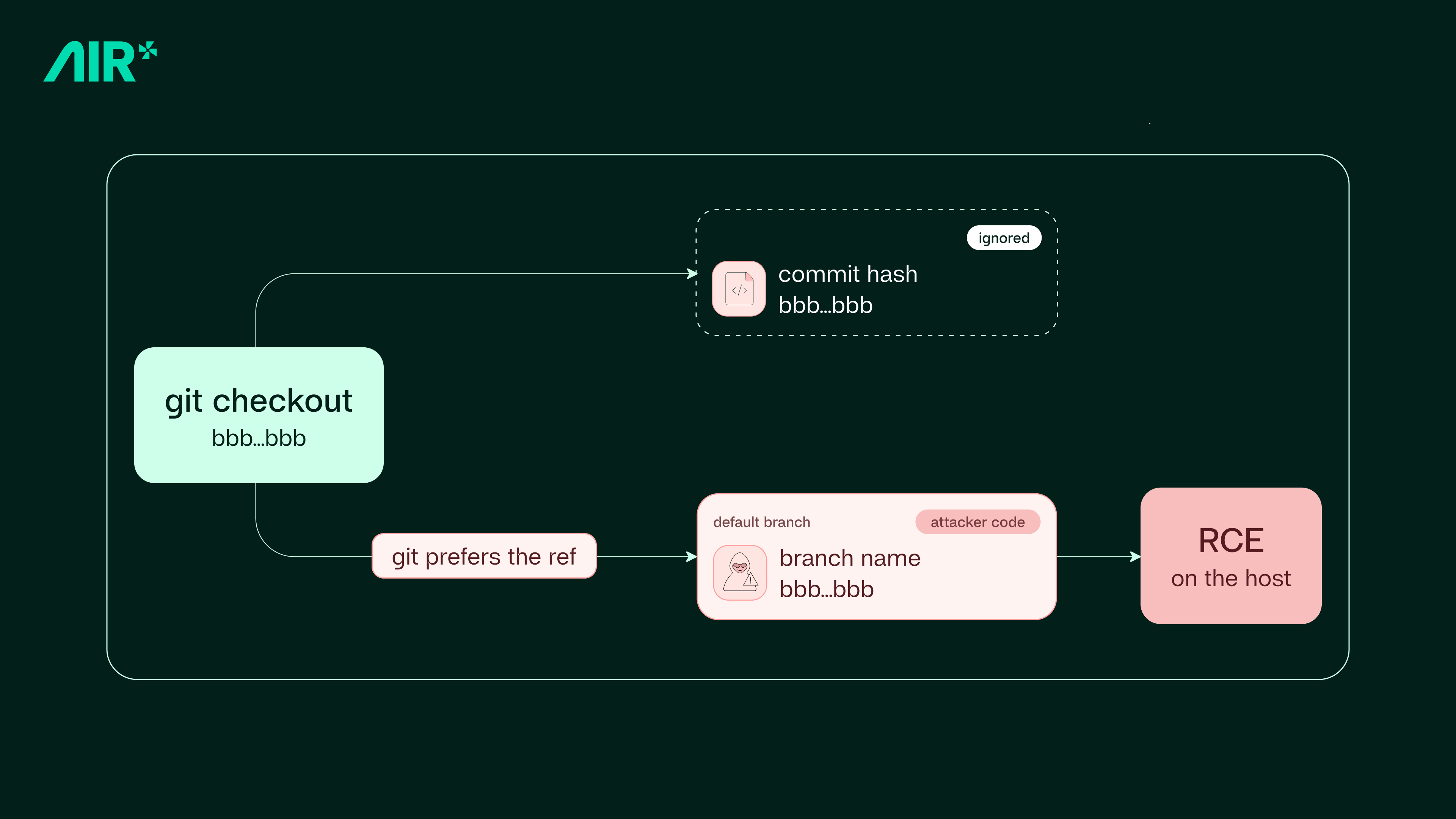
AIR’s technical write-up says the affected clients could perform a checkout using the pinned value but fail to verify the resulting HEAD. For Claude Code, Codex and GitHub Copilot, AIR describes an ambiguity where an attacker-controlled Git host can expose a default branch whose name looks exactly like the 40-character commit SHA. Git can then resolve that name as a ref rather than the intended object.
The pin has not disappeared. The approved commit can still exist. The security record can still say “we pinned bbb...bbb.”
But the files in the working tree can come from somewhere else.
A pinned commit is evidence of intent. Verifying the resolved revision is evidence of execution identity.
That distinction sounds small until the thing consuming the code is an agent with access to source repositories, shell commands, credentials, cloud tools, internal APIs and deployment systems.
How Plugin4Shell turns a trusted update into an untrusted execution
AIR outlines two broad ways an attacker could reach the position needed to exploit the flaw.
The first is a classic rug pull: publish something useful, let it pass review, earn adoption, then turn the upstream repository malicious later.
The second is uglier because the original author does not need to become malicious at all. If an attacker takes over the repository behind a legitimate plugin, the trust accumulated by that plugin becomes part of the attack surface.
In AIR’s example flow, the marketplace can even approve a routine, benign update first. The problem appears later, after the attacker creates a malicious branch whose name collides with the newly pinned revision and makes that branch the default.
If the client resolves the ambiguous checkout to the branch and never verifies HEAD, the installation can report success while the agent receives attacker-controlled files.
Why “zero-click” matters here
Plenty of supply-chain attacks still need somebody to do something reckless: install a package from a random repository, approve an obvious permission request, or paste a command they do not understand.
AIR’s argument is that Plugin4Shell can cross that line after the user has already made the original trust decision.
Claude Code and Codex, according to AIR, used background plugin auto-update in the affected scenario. Once a marketplace moved its pin to the next approved revision, the update path could run again without the user choosing a new plugin or approving a fresh install.
The dangerous event is no longer “somebody installed a malicious plugin.”
It becomes “a plugin we already trusted changed identity between what we intended to install and what the agent actually resolved.”
That is a much harder problem for a security program built around one-time approval.
Which AI coding agents were affected?
Status note: this table reflects the best-supported status used for the Day 2 package, with AIR’s September 17 disclosure and independent reporting. Vendor positions are not identical, so the table separates claims instead of pretending there is one universal current state.
| Tool | What AIR reported | Status / important nuance |
|---|---|---|
| Claude Code | Affected by the SHA-like ref ambiguity path described by AIR. | AIR says Anthropic patched the issue in Claude Code 2.1.179. |
| OpenAI Codex | Affected by the same broad pin-verification failure class. | AIR says the issue was fixed in Codex 0.146.0. |
| GitHub Copilot | AIR reported the flaw and said no agent-side fix had shipped at disclosure. | GitHub told The Register that GitHub-hosted repositories block branch/tag names resembling commit SHAs, preventing the reported branch-name exploit on GitHub. AIR argues marketplaces hosted on other supported Git platforms can still preserve exposure. |
| Gemini CLI | AIR reported a separate resolution issue involving FETCH_HEAD. |
AIR says Google deprecated Gemini CLI and would not patch this issue, recommending migration to Antigravity. Teams should verify current Google guidance before acting. |
The GitHub point is worth lingering on because security reporting often loses nuance here.
A sentence such as “GitHub Copilot is vulnerable to Plugin4Shell” is too broad without describing the hosting condition. GitHub says its own hosting rejects the SHA-shaped branch names needed for AIR’s demonstrated branch-collision path. AIR’s counterpoint is that plugin marketplaces can use other supported Git hosting where those names remain possible.
Those statements can both be true.
The lesson is not to choose the more dramatic sentence. It is to understand where the trust boundary actually lives.
The fix is almost embarrassingly simple
At the core of AIR’s technical explanation is a check that should make every engineer uncomfortable because of how small it is.
After checkout, resolve the revision that is actually in the working tree. Then compare it to the revision you intended to install.
test "$(git rev-parse HEAD)" = "" || abortThat line is not a complete supply-chain security program. But it captures the principle Plugin4Shell violated:
Do not trust the requested identifier. Verify the resolved state.
Security teams already use this idea in other places. You verify downloaded artifacts against checksums. You verify signatures rather than trusting a filename. You verify a deployed image digest instead of assuming the tag still points to the same build.
AI-agent plugins deserve the same discipline.
And then AIR published another warning: one-time scanning is not enough either
Plugin4Shell would already justify a rethink of plugin updates. But AIR’s follow-up research makes the broader lesson harder to avoid.
On September 24, AIR published testing in which it said malicious skills could slip past Anthropic’s built-in scanner through patterns involving external resources, spoofed URLs and opaque behavior. The claim should remain attributed to AIR’s testing; it is not proof that every skill scanner fails in the same way.
But the architectural problem is familiar.
A scan sees a snapshot. Dependencies, URLs, repositories and packages can change later.
Then, on October 5—the date of this Day 2 package—AIR published an agent supply-chain framework built around exactly that issue. It argues teams need visibility into what add-ons are installed, control over how they update, ongoing review rather than install-time review alone, and a way to remove compromised add-ons quickly.

What developers and startup teams should do now
You do not need an enterprise security department to improve this. You need to stop treating agent extensions like harmless editor themes.
- Update affected clients. If your agent has a vendor fix, move to the fixed version. AIR identifies Claude Code 2.1.179 and Codex 0.146.0 as patched releases.
- Inventory your agent add-ons. Plugins, skills, MCP servers, hooks, sub-agents and marketplace integrations should not live only in individual developers’ laptops and memories.
- Record the source and exact revision. “Installed from GitHub” is not enough. Capture the repository, host, expected revision and version.
- Verify what actually resolved. Where you control the installer or build process, verify the checked-out revision instead of trusting the argument passed to checkout.
- Review update behavior. Know which extensions auto-update, which require approval and which can pull from non-GitHub hosts.
- Treat a meaningful update as a new trust event. A plugin that was safe three weeks ago is not automatically safe after its repository, dependencies or external instructions change.
- Reduce agent permissions. Supply-chain compromise is more damaging when the compromised agent can read secrets, write production code, deploy, access customer data and call internal systems without meaningful boundaries.
- Keep post-change evidence. When code or dependencies change, preserve what was reviewed and what revision the result refers to.
- Watch the live application too. Pre-release review cannot tell you everything about what happens after the software encounters production traffic and real users.
Where QC Guard fits—and where it does not
Plugin4Shell is a useful story for Codie because it exposes the same underlying question QC Guard is designed to make explicit:
Which exact revision does this evidence belong to?
QC Guard ties relevant GitHub change reviews to the selected branch and exact source revision. Its Analysis Integrity guard is specifically designed to confirm that results, evidence and status reasoning refer to that same revision. Missing or inconclusive evidence is not supposed to be presented as a clean pass.
That is a healthy pattern for AI-assisted software quality.
But the boundary matters. QC Guard should not be described as a Plugin4Shell detector. Its public product description does not claim to secure coding-agent plugin installation flows or prevent the Git ref ambiguity AIR disclosed.
Its role is broader lifecycle evidence: selected GitHub repositories, nine advisory quality guards, exact-revision review, explicit human control over remediation and deployment decisions, and separate runtime visibility into errors, affected users, slow requests, Web Vitals, releases and alerts after setup.
In other words, the connection is not “QC Guard would have stopped Plugin4Shell.”
The connection is this:
Software quality gets weaker the moment evidence is detached from the exact thing that actually ran.
Plugin4Shell demonstrated that problem at the plugin installation layer. QC Guard applies the same exact-revision discipline to application quality evidence and then keeps watching after release.
Make “which revision?” a first-class question.
QC Guard connects selected GitHub changes to exact-revision advisory evidence across nine quality areas, keeps remediation and release decisions human-controlled, and adds separate runtime health visibility after deployment.
The real lesson from Plugin4Shell
It would be easy to file Plugin4Shell under “another AI security bug” and move on.
That misses what makes it useful.
The failure happened after people had already done the responsible-looking things: use a marketplace, review the code, pin the revision.
The remaining gap was identity.
Did the code that ran actually match the code everyone thought they had approved?
As AI agents become more capable—and as plugins, MCP servers, skills and sub-agents become the software supply chain around those agents—that question needs to appear everywhere: installation, review, remediation, release and production.
Because “we checked it” is not the strongest evidence.
“We checked this exact thing, and we verified that this is the exact thing that ran” is.
FAQ: Plugin4Shell and AI coding-agent security
What is Plugin4Shell?
Plugin4Shell is the name AIR Security gave to a plugin SHA-pinning bypass it disclosed in September 2026. AIR reported that affected AI coding agents could request a pinned plugin commit without sufficiently verifying that the checked-out revision actually matched it, allowing attacker-controlled code to run under specific conditions.
Which AI coding agents were affected?
AIR reported affected flows in Claude Code, OpenAI Codex, GitHub Copilot and Gemini CLI. AIR says Claude Code 2.1.179 and Codex 0.146.0 were fixed. GitHub says its own hosting blocks the SHA-like branch-name condition used in AIR’s Copilot attack path, while AIR argues other supported Git hosts can still preserve exposure. AIR says Gemini CLI was deprecated rather than patched.
Why is Plugin4Shell zero-click?
AIR says background plugin auto-update in affected configurations could deliver the swapped code to an already-installed plugin. The user would not need to choose a new plugin or approve a fresh installation.
Does pinning a Git commit make a plugin safe?
Pinning is valuable, but Plugin4Shell shows that the consumer must verify the resolved checkout as well. A pin records the revision you intended to install; checking the resulting HEAD proves which revision actually landed.
Does GitHub say GitHub-hosted repositories are vulnerable?
No. GitHub told The Register that it blocks branch and tag names that resemble commit SHAs, which prevents AIR’s demonstrated SHA-like branch-name path on GitHub-hosted repositories. AIR argues the broader marketplace path can still matter when other supported Git hosts allow those names.
Can QC Guard detect Plugin4Shell?
Codie does not publicly claim that QC Guard detects or blocks Plugin4Shell. QC Guard’s relevant connection is exact-revision quality evidence, nine advisory guard areas, human-controlled remediation and deployment decisions, and separate runtime monitoring after release.
Sources
- AIR Security — “Plugin4Shell - Zero Click RCE Vulnerability found in top 4 most popular coding agents” (September 17, 2026)
- AIR Security — “The Agent Supply Chain Framework: 4 Actions to Secure Your AI Agent Add-ons” (October 5, 2026)
- AIR Security — “Scan me, Scan me not: Anthropic Built A Skill Scanner. We let Claude bypass it in 7 minutes.” (September 24, 2026)
- The Register — independent reporting including GitHub’s response and AIR’s counterpoint (September 17, 2026)
- Help Net Security — independent summary of Plugin4Shell and vendor responses (September 18, 2026)
- Codie Marketplace — QC Guard current product behavior